Earned Value
The time phased budget data is the foundation for performing the project's planned work effort. The budget data is often produced from a network schedule of resource loaded activities that reflect the planned sequence of work and resource requirements to produce the related staffing plan. Once you have established the budget baseline, the intent is to measure work and financial performance on a regular basis, typically every accounting calendar period. You assess work progress and the actual costs incurred to do the planned work so you can proactively manage the remaining work effort, the estimate to complete. As needed, it may be necessary to process a baseline change request to modify the plan for the remaining work.
The earned value data is calculated every status and analysis cycle based on the work progress you claim for the work packages in your schedule tool or in EVMax. How you status your work packages depends on whether you have integrated your schedule and cost data, work package assumption type, and the earned value technique (EVT) assigned to the work package. Once you import or enter your current reporting period status for the work package, the EVMax calculates the earned value for the current reporting period.
 Importing Work Package Status from a Schedule Tool
Provided you have created your budget data in EVMax from Microsoft Project (MSP) or Oracle Primavera P6, you can import your current schedule status as the basis to calculate the current reporting period earned value for a work package.
Begin the status process In your schedule tool.
- Update the current status date in the schedule tool to match the current period ending date in EVMax.
- Enter activity status as needed to reflect in progress or completed work for the current reporting period. This includes the actual start date when an activity begins, actual finish date when an activity completes, and physical percent complete. The schedule activity physical percent complete is the basis to calculate the work package percent complete in EVMax.
When you import the schedule status into EVMax, the work package status fields are updated to reflect the schedule source data based on whether there is a one-to-one or many-to-one relationship between the schedule activities and a work package.
| Work Package Status | One-to-One Relationship | Many-to-One Relationship |
|---|---|---|
| Actual Start | Matches the schedule activity actual start date. | Matches the earliest schedule activity actual start date. |
| Actual End | Matches the schedule activity actual finish date. | Matches the latest schedule activity actual finish date. |
| Percent complete | Matches the schedule activity physical percent complete. | Reflects a calculated cumulative to date percent complete for the activities using the schedule activity physical percent complete. The calculated percent complete is equal to the cumulative to date earned value divided by the budget at completion. |
Entering Work Package Status
The following table lists the earned value techniques (EVTs), the typical work package assumption type associated with the EVT, use notes, and how each EVT is statused.
| EVT | Work Package Assumption | Use Notes | Status |
|---|---|---|---|
| 50-50 | Bottoms Up, Parametric | Used for work packages that span two reporting periods. Fifty percent of the budget is earned when work begins and the other 50 percent is earned when work completes. | Enter Actual Start when work begins. Enter Actual Finish when work concludes. |
| 0-100 | Bottoms Up, Parametric, Travel | Used for short duration work packages where the work can be completed within one reporting period; 100 percent of the budget is earned when the work completes. | Enter the Actual Start and Actual Finish. |
| Earned as Spent | Bottoms Up, Material | Sometimes used for low value or commodity materials such as nuts and bolts. When the material assumption type is used and you are sharing data between BOEMax and EVMax, select the materials from the project's bill of material (BOM). In EVMax, earned value is calculated using this formula: (Earned = (actual costs / EAC) * BAC). Be sure to first import actual costs for the current reporting period. An estimate at completion value is also required. | Click Generate Earned in the Ribbon Menu |
| Earning Rules (Milestones) | Bottoms Up, Parametric | Best means to objectively measure completed work for longer duration work packages. For this EVT, define the accomplishment milestones along with the weight for each milestone. See Milestone Library as well as Define Earning Rule Milestones. When a milestone is completed, the weight is translated to a percent complete for the work package. | Enter an Actual Start and check off each milestone when it is completed. Enter an Actual Finish when work concludes. |
| Level of Effort (LOE) | Bottoms Up | Typically used for support type of activities such as project management or quality assurance. By definition, earned value is always equal to the budget (no schedule variance in cost terms). | Automatically calculated when the calendar is advanced |
| Percent Complete | Bottoms Up, Parametric | Used for longer duration work packages. Less objective alternative to the Earning Rules EVT. | Enter an Actual Start when work begins. Enter a cum to date percent complete. Enter an Actual Finish when work concludes. |
| Planning Package | Typically Bottoms Up | This is not an earned value technique. It is a way to identify future work effort (scope, schedule, and budget) to be broken down into more detail before work begins. A planning package may be a higher summary level planning package (SLPP) in the work breakdown structure (WBS) or a control account level planning package. A summary level planning package is broken down into one or more control accounts and related work packages. A control account level planning package is converted to one or more control account work packages. | First convert to a control account work package with an assigned EVT. |
| Quantities | Material | When sharing data between BOEMax and EVMax, select the materials from the project's bill of material (BOM) to create the time phased values. | Enter an Actual Start when work begins and then enter quantities earned in the Resource BOM window. Enter an Actual Finish when work concludes. |
| User Defined | Bottoms Up | User defined variation of the 50-50 or 0-100 EVT. Define the percentage of budget earned when work begins and ends. For example: 60-40. | Enter Actual Start when work begins. Enter an Actual Finish when work concludes. |
Implementation Tips
- Remember that earned value techniques are assigned at the work package level in EVMax. Once you status the work package, the earned value for the current reporting period is calculated using the work package percent complete. This is determined based on the work package earned value technique and current status.
- If you discover an error in the earned value data for the current reporting month, you can remove the current reporting period earned value data, make your corrections, and then recalculate earned value.
- As a general rule, earned value always uses the same labor and overhead rates as the budget data. When a work package is complete, the budget at completion for the work package is always equal to the cumulative to date earned value.
What do you want to do?
- Advance the Calendar to the next calendar reporting period end date (current time now) in the main EVMax window, Admin tab if you haven't already done so. You must be an administrative user to advance the calendar for a project.
- For work packages assigned the Earning Rules earned value technique. If you haven't already done this when you created your budget data, be sure to Select Milestones from Libraryor Define Earning Rule Milestones for the work package.
- If you haven't used schedule data to create the budget data, manually Status Work Packages.
- Status Material Work Packages with the earned quantity for projects imported from BOEMax that used BOMs to create the budget data. This option can be used for Material assumption type work packages assigned the Quantities earned value technique.
- Generate Earned for work packages assigned the Earned as Spent earned value technique. Before you do this, be sure to import the actual costs for the current reporting period and update your estimate to complete (ETC) to determine the estimate at completion (EAC).
- If you used schedule data to create the budget data, Import Schedule Status. Importing schedule status also applies to projects where the schedule data was used to create the data in BOEMax and shared with EVMax. You must be an administrative user to import the current schedule status.
- View Work Package Status or View the Earned Spread.
- Correct an error in the earned value data for the current reporting period. See Remove Current Earned Values. You must be an administrative user to remove the current earned values.
Main EVMax Tab, Resources Tab, Earned Tab
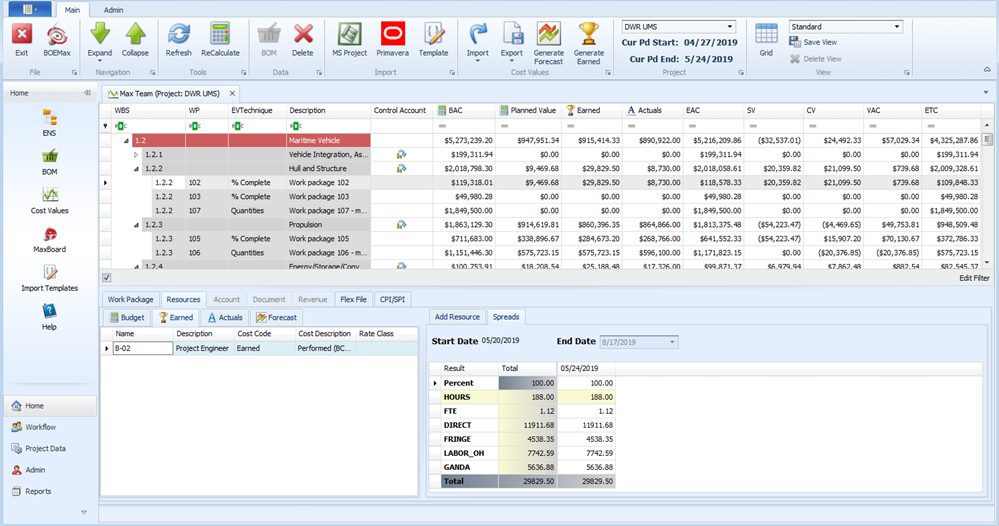
To customize your view, see Window Configuration.
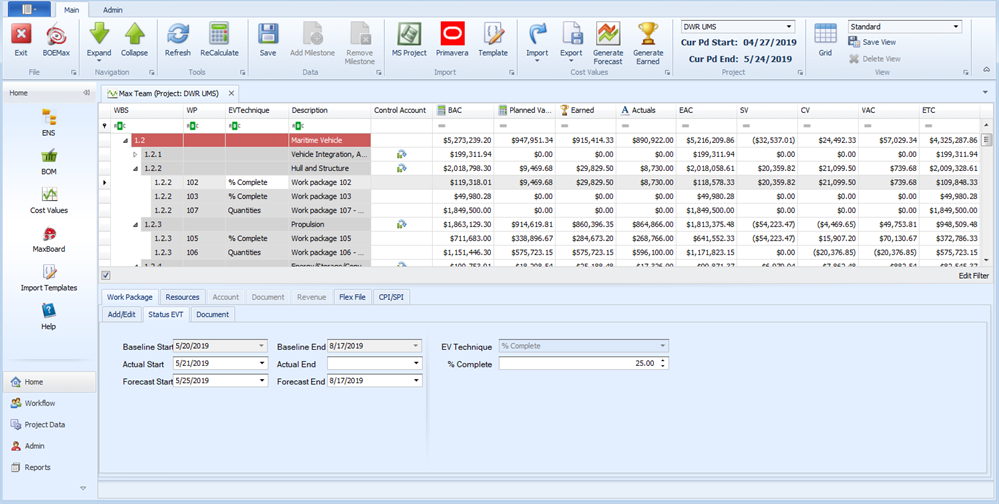
Work Package Status EVT Tab
The Status EVT tab is used to view the work package start and end dates, enter an Actual Start or Actual End date, or to manually enter the work package status.